Hotels & attractions · HD · Bulk ZIP
Booking.com hotel and attraction photos—previewed, then packed
Hotel teams benchmark competitors. Travel advisors build itineraries with sights and stays. Researchers archive visuals—without right-clicking every gallery tile. Booking Image Downloader works from the live listing page so hotels and attractions share one export flow.
Built for property marketing, trip proposals, and destination content—without pretending a twenty-tab save marathon is good enough.
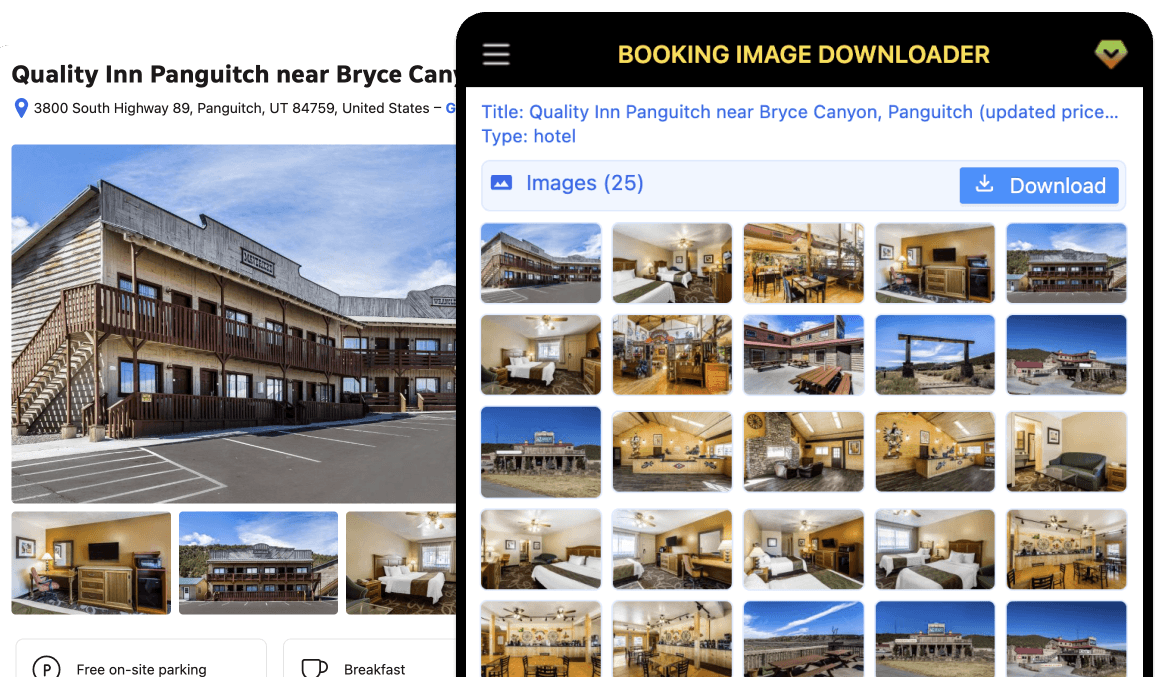
Built for Booking hotels and attractions
Heavy galleries, property types, and HD sources are the norm—your export flow should match that reality.
Hotels and attractions, same workflow
Whether you are on a hotel stay page or an attraction listing, open the extension panel and work from one gallery view—no separate tools per property type.
Dozens of photos, one calm grid
Booking listings pile on images fast. Instead of right-click chaos, see every detected photo in a single panel with an image count before you export.
One-click ZIP bulk download
Pro subscribers export the full set in one action. Designers, travel advisors, and researchers get a ready-to-share archive instead of a folder of mismatched filenames.
Higher-resolution files for real reuse
Marketers and editors need pixels, not mushy previews. The extension targets high-resolution sources where Booking exposes them on the page.
Title and property type at a glance
The panel shows the listing title and Type—hotel, attraction, and other values Booking provides—so you know what you are exporting before you download.
Runs beside the page you are on
No separate crawler or mystery server job. The panel lives next to the Booking listing, locally in your browser session, under your control.
What the extension shows before you download
Hotel and attraction pages both surface the same panel fields—preview the gallery and count before you export.
Listing title
The property or attraction name as shown on the Booking page.
Property type
Hotel, attraction, and other types Booking assigns—so you can tell stays from sights at a glance.
Image count + grid
A thumbnail grid with total count (e.g. Images (25)) before you commit to a bulk download.
Availability of each field depends on the Booking page type. Plan limits are described in Pricing.
How it works
From install to an organized bundle in three steps.
Install the extension
Add Booking Image Downloader from the Chrome Web Store or follow the guided install.
Open a hotel or attraction page
Browse to any Booking.com hotel or attraction detail page and wait for photos to load.
Download from the panel
Use the extension sidebar to preview the gallery, then export a ZIP when you are on Pro.
Simple pricing for bulk image exports
Start free on hotel and attraction listing pages. Upgrade to Pro for monthly subscription—bulk ZIP downloads included. Cancel anytime.
Free
Install the extension and explore the panel on real Booking hotel and attraction listings before you subscribe.
- Open the sidebar on Booking hotel and attraction pages
- Preview detected photos, title, and property type
- Extension updates while on the free tier
- Bulk ZIP download is not included
Pro
For teams and creators who need every hotel or attraction photo in one ZIP, with listing context in the panel.
- Bulk ZIP download on hotel and attraction pages
- Full gallery export from the listing you are viewing
- Listing title and property type shown in the panel
- High-resolution sources where Booking exposes them
- Priority support from the ExtensionsFox team
- Updates included while subscribed
Ship your next hotel or attraction gallery without the save-a-thon
Add Booking Image Downloader and keep gallery work on the page where decisions already happen.
Get Booking Image DownloaderFrequently asked questions
Which Booking.com pages are supported?
Use the extension on Booking.com hotel (accommodation) and attraction detail pages where a photo gallery is available. Coverage follows what Booking exposes on each page type; listings without a gallery may show few or no images.
Where do I see what each plan includes?
See the Pricing section on this page for a clear comparison of Free and Pro capabilities.
Is Booking Image Downloader affiliated with Booking.com?
No. Booking Image Downloader is published by ExtensionsFox and is not endorsed by or affiliated with Booking.com. Trademarks belong to their respective owners.
What should I know about terms of use?
You are responsible for complying with Booking.com’s terms of service, applicable laws, and any agreements that govern your access to listing content. Use the extension only for scenarios you are authorized to copy or export.
Do you store the photos I export?
This marketing site does not run exports for you. The extension operates in your browser. Refer to the Chrome Web Store listing and our Privacy Policy for how ExtensionsFox handles support or account-related data.
Who can I contact for help?
Email help@extensionsfox.com with questions about billing, installation, or troubleshooting.